The key that replaces every MFA app.
A hardware security key (FIDO2/WebAuthn) is the most robust second factor — for Google, Microsoft, Apple, GitHub and every account that supports it. Nothing to type, nothing to phish, no battery. For your phone, pick a version with NFC or USB-C.
official store · worldwide shipping
or see it on Amazon →
Why a security key?
Three reasons a physical key does more than any app.
It replaces the app
Instead of typing a code from an authenticator app: just tap. For every account that supports FIDO2/WebAuthn.
It can't be phished
The key cryptographically checks the real domain. On a fake site it reveals nothing — codes and SMS can be intercepted.
It works without a battery
Nothing to charge, no screen, no updates. Works for years — and offline, because it creates the response itself.
MFA, 2FA, TOTP, passkey — explained
The terms you'll see before choosing.
- MFA (multi-factor authentication)
- Several factors to sign in — e.g. password + code + device. The more independent factors, the harder the attack.
- 2FA (two-factor authentication)
- Exactly two factors: knowledge (password) + possession (key) or + code.
- TOTP
- The 6-digit code in an authenticator app (Authy, Google Authenticator …), new every 30 seconds. Good, but typeable — and therefore phishable.
- FIDO2 & WebAuthn
- The open standard for security keys and passkeys. The key answers cryptographically to the real domain — on foreign sites it stays silent.
- Passkey
- A key that handles the whole sign-in (no password). Security keys and passkeys are both based on WebAuthn.
How it works
Three steps, no code, no app.
Register
Add the key once in the security settings of the service (Google, Microsoft, GitHub …).
Tap
Hold the key to your phone (NFC) or plug it in (USB-C) when signing in.
Confirm
The device confirms — done. Nothing to type, nothing to remember.
What it really does better
Six arguments that aren't marketing speak.
Phishing-resistant
The key checks the real domain (WebAuthn). A TOTP code can be captured on a convincing fake site — a key reveals nothing on foreign domains.
No code, no typing
No six digits, no counting seconds, no app that needs updating. One tap.
Works offline
The key creates the response itself. Your phone needs no internet connection to use it.
One key, many accounts
Google, Microsoft, Apple, GitHub, Dropbox … — the same key works everywhere FIDO2 is supported.
Tough and maintenance-free
No battery, no display, no updates. Years on your keyring — splash-resistant and impact-resistant.
Possession instead of password
A stolen password isn't enough: without the physical key, nobody gets in.
Models & price
For phones, what matters is NFC or USB-C. Prices are approximate and may vary by retailer.
YubiKey 5 NFC
The classic: USB-A for laptops/desktops, NFC for phones. Fits older devices.
YubiKey 5C NFC
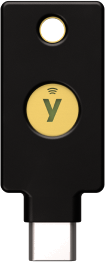
The modern version: USB-C for phones, tablets and laptops, NFC for tapping.
Buy two
One on your keyring, one as a backup at home. Lose one and you can otherwise be locked out.
Also works in the Walkie app
In the Walkie app (push-to-talk translation for travel) you can add a FIDO2 key as a second factor under “System → Security keys”. The authenticator app (TOTP) stays as a fallback.
The key itself is independent of Walkie: it works with every account that supports FIDO2.
Good to know
Not every account supports it. Many major services do, some niche services don't — there, the authenticator app stays.
Your phone needs NFC or USB-C. Pure USB-A models without NFC (e.g. Nano) are meant to stay plugged into a computer.
Buy two. A single key is a single point of failure.
Available worldwide. Yubico ships internationally via their official store.
FAQ
Does a security key replace my MFA app?
For every account that supports FIDO2/WebAuthn (Google, Microsoft, Apple, GitHub, Dropbox and others), yes. For older services that only support TOTP, the authenticator app stays as a fallback.
Which key fits my phone?
If your phone has USB-C, get the 5C NFC. For older devices with USB-A, the 5 NFC. Both include NFC, so tapping works.
Why is a security key phishing-resistant?
The key binds its response cryptographically to the real domain (WebAuthn). On a fake site it reveals nothing — a typed TOTP or SMS code can be intercepted.
Do I need one key or two?
Buy two — one for everyday use, one as a backup. If you lose one, you could otherwise be locked out.
Is it a subscription?
No, a one-time purchase. The device is yours; there are no monthly fees.
What's the difference between MFA, 2FA, TOTP and a passkey?
MFA means multiple factors. 2FA means exactly two. TOTP is the 6-digit code in an authenticator app. A passkey handles the whole sign-in — security keys and passkeys are both based on WebAuthn.
Can I use it for the Walkie app?
Yes. In the Walkie app, add a FIDO2 key as a second factor under “System → Security keys”.
What if I lose the key?
Sign in with your second (backup) key and remove the lost one from your accounts. That's why you buy two.
Advertising/affiliate: This page may contain affiliate links, e.g. to the Amazon Associates program. If you buy through them, we receive a small commission — the price for you stays the same. The recommendation is based on technical grounds; we make no health or performance claims and give no guarantee of features. Prices, availability and product data may change at any time. Product photo: Yubico.
More at yubico.com